How to Set Up a Habit Tracker on iPhone
You picked a few habits, maybe on a printable sheet or in a notes list, and by the second week the boxes started staying empty. The habits were fine. The tracker was just somewhere you did not look.
 CharacterSheet is an iPhone and Apple Watch appPoint your iPhone camera at the code to install it.
or text me the link
The short answer
Your iPhone has no app called Habits, but it already has what a basic habit tracker needs. Make one reminder per habit in the Reminders app, set each to repeat, and put the Reminders widget on your Home Screen so the list is in front of you every time you unlock the phone (see Step 2 and Step 3). That is free and takes five minutes.
It works because the act of recording is the useful part. A large review of experiments found that people who monitored their progress reached their goals more often, and the effect was bigger when they wrote it down. What a checklist does not do is keep score: a ticked reminder goes out of view, and nothing adds up over weeks. If that is the part you are missing, a tracker that turns the ticks into a running score helps, and that is where an app earns its place (see Keeping score).
Why habit trackers work
The strongest evidence comes from a 2016 meta-analysis in Psychological Bulletin. Its authors pooled 138 experiments with 19,951 participants, where some people were asked to monitor their progress toward a goal and others were not. Monitoring raised goal attainment with a small to medium effect. Two details matter for a habit tracker: the effect was larger when progress was physically recorded, and also larger when it was reported or made public.
So the tick itself is doing work. It turns "I think I did it most days" into a record you cannot argue with, and a record you look at is a nudge for tomorrow.
The other half is time. In a well known study from University College London, participants picked one daily health behaviour tied to a cue, like a piece of fruit with lunch, and reported how automatic it felt for 84 days. The average time to reach the plateau was 66 days, with a range from 18 days to a predicted 254. Exercise habits took about one and a half times as long to settle as eating or drinking ones. Researchers from the same UCL department warn against pinning a single number on it.
The practical reading: a tracker has to survive two months or more, not two weeks. Build it for that.
Step 1: Pick habits you can tick
A tracker only works if each line has a clear yes or no by bedtime. "Get fit" never gets ticked. "Ten push-ups" does.
- Make it small enough for a bad day. The version you can do with a cold, on a late train, is the one that lasts.
- Tie it to something that already happens. The UCL participants attached their behaviour to a daily cue. After coffee, before the shower, when the laptop closes.
- Start with fewer than you want. Three is plenty. A longer list turns one bad day into a wall of empty boxes.
There is more on choosing them in the guide to small daily habits that stick.
Step 2: Build the tracker in Reminders
The built-in Reminders app is the free way to do it. These steps follow the built-in Reminders app on iOS 27.
- Open Reminders. Make a new list for your habits so they do not mix with errands.
- Tap New Reminder and type the habit, for example "Read ten pages".
- Tap the Date and Time button and give it a time on the day you want it.
- Open the reminder's details and set it to repeat every day.
- Do the same for each habit, three at most to begin with.
When you do the habit, tap the empty circle next to it to complete it. Completed reminders drop out of the list; to see them again, tap the More button, then Show Completed. That is the closest thing Reminders has to a history.
Step 3: Put it on your Home Screen
A tracker you have to open is a tracker you forget. Apple's steps for adding a widget:
- Press and hold an empty area of the Home Screen until the apps start to jiggle.
- Tap Edit in the top-left corner, then Add Widget.
- Find Reminders, choose a size, and tap Add Widget.
- Drag it where your thumb lands first, then tap Done.
Now the list is the first thing you see, many times a day, without opening anything.
Step 4: Check in at one fixed time
Pick one moment each evening and look at the list then. It is early enough to still do what is left and late enough to know how the day went. Tie it to something that happens anyway: dinner dishes, brushing your teeth, plugging in the phone.
The research on monitoring is about frequency. The review found that interventions worked partly by making people check their progress more often. One daily look is the floor.
Step 5: Plan for the day you miss
You will miss a day. In the UCL study, a single missed day had little effect on how automatic the habit became later. What did hurt was a lot of missed repetitions, even spread out over time. So one miss is nothing to panic about, but misses add up. A rule of thumb many people use: never miss twice in a row.
Decide your minimum now, while you are calm. "On a bad day, one page" is a decision you do not want to make at 23:00. The guide on keeping a workout streak going goes deeper on low bars and comebacks.
Where a plain checklist falls short
If Reminders and a widget keep you going, keep using them. Nothing below is a reason to switch if it works.
To fix all three on paper before trying an app, gamifying your life with points, levels and a streak lays out the rules step by step.
It can stop working in the second month, for reasons that connect to the research above:
- No running record. Ticked items leave the list. After six weeks you cannot see at a glance whether you did 30 days or 40.
- Nothing adds up. Every tick is worth the same as the first one, so day 50 feels like day 1. The habit is building, but you cannot see it.
- A miss costs nothing. That sounds kind, and it is, but it also means skipping the whole list is free.
A printable paper sheet fixes the first point. It still leaves you doing the maths by hand.
Keeping score: a habit tracker with levels
CharacterSheet is a fitness RPG for iPhone and Apple Watch, and its habit side works like the tracker above with a score attached. Here is how it maps:
- Your habits are dailies. On Home, the Daily willpower card holds up to five of them. Tick each one as you do it.
- Ticks build a stat. Dailies train Willpower, one of six stats that level from 1 to 60. At the start, one daily a day is enough to count; the bar rises by one daily every ten Willpower levels, and never above the number you have set up.
- A miss costs something, but not everything. A day with none done takes some Willpower XP. A day below the bar that still has one tick costs nothing, and no miss ever takes a level.
- It shows up on your Home Screen. The Daily willpower widget lists your dailies with a tick button on each, so you can check one off without opening the app. On Apple Watch, a complication shows the dailies you have left.
- It reminds you once. In Settings, set your Evening time. The Dailies reminder arrives then, unless you have already reached the day's bar.
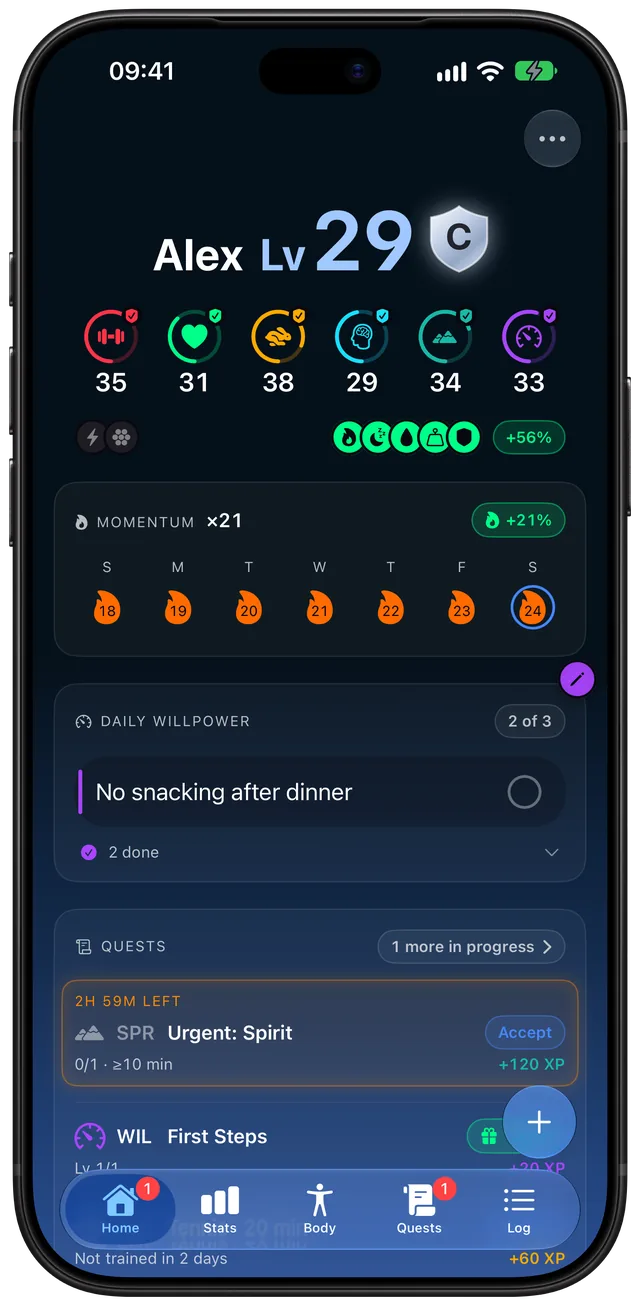
Training habits get their own streak. Any timed session of five minutes or more lights the day for Momentum, and each day in a row adds 1% bonus XP, up to 50%. Miss a day and the count goes back by two days instead of to zero. Reading and studying count as training too; the guide to tracking reading and study time shows how, and how to level up in real life explains the six stats.
Which setup fits you
| You want | Use | See |
|---|---|---|
| A free daily checklist | Reminders, repeating | Step 2 |
| The list in sight all day | A Home Screen widget | Step 3 |
| A habit that survives a miss | A minimum and a quick comeback after a miss | Step 5 |
| A score that adds up | CharacterSheet dailies | Levels |
Sleep, water and weigh-ins are habits too, and quieter ones. The guide to tracking sleep, water and weight on iPhone covers those with Apple Health.
Frequently asked questions
How do I make a habit tracker on my iPhone?
Create a list in the Reminders app, add one reminder per habit with a time, and set each to repeat daily. Then add the Reminders widget to your Home Screen so the list is visible all day. Tick each habit as you do it and look at the list once every evening.
Why do habit trackers work?
Recording progress is a proven nudge. A 2016 meta-analysis of 138 experiments found that monitoring progress helped people reach their goals, and the effect was larger when progress was physically recorded or shared. The tick turns a vague feeling into a record you see the next day.
How long does it take for a habit to stick?
Usually longer than 21 days. In the UCL study by Lally and colleagues the average was 66 days, ranging from 18 days to a predicted 254, and exercise habits took longer than eating or drinking ones. Plan for a tracker you can keep using for at least two months.
Does missing one day ruin a habit?
No. The same study found a single missed day had little effect on how automatic the habit became. Many missed days did lower it, even when they were spread out, so the useful habit is to get back to it the next day. A common rule of thumb is never to miss two days in a row.
Is there a habit tracker widget for iPhone?
Yes. The built-in Reminders widget can show your habits list on the Home Screen. CharacterSheet also has a Daily willpower widget with a tick button on each daily, so you can check one off without opening the app.
What is the best free habit tracker on iPhone?
If you only need a daily checklist, the Reminders app that comes with your iPhone does it for free. An app is worth it when you want a running score, a streak that survives a miss, or habits that add up to something over months. CharacterSheet does that as a subscription with a free trial.
Sources
- Harkin et al. (2016), Does monitoring goal progress promote goal attainment? A meta-analysis, Psychological Bulletin
- Lally, van Jaarsveld, Potts and Wardle (2010), How are habits formed: Modelling habit formation in the real world, European Journal of Social Psychology
- BPS Research Digest: How long does it take to form a habit? (Lally et al., 2010)
- UCL Behavioural Science and Health blog (Gardner and Meisel, 2012) on how long habits take
- Apple Support: Use Reminders on your iPhone
- Apple Support: How to add and edit widgets on your iPhone
- Apple: iOS 27